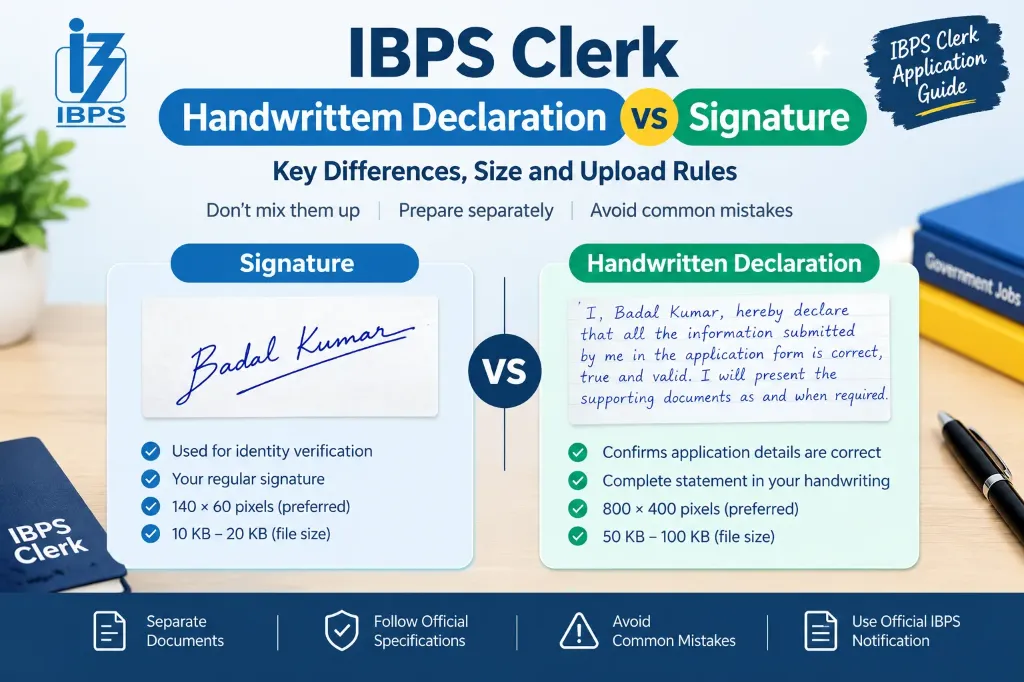
When filling out the IBPS Clerk application form, candidates are usually required to upload several documents, including a photograph, signature, left thumb impression, and handwritten declaration. Since both the signature and handwritten declaration are written by hand, many applicants confuse these two requirements.
However, they serve completely different purposes and have separate upload specifications. Uploading the same image in both fields or preparing either document incorrectly can create problems during application submission.
This guide explains the difference between the IBPS Clerk handwritten declaration vs signature, including their purpose, image dimensions, file size, writing rules, and common mistakes to avoid. (If you are also preparing for managerial exams, review our IBPS PO Signature Size 2026 Guide).
What Is the Difference Between an IBPS Clerk Handwritten Declaration and Signature?
The main difference is their purpose:
- A signature is the applicant’s personal mark used for identity and verification.
- A handwritten declaration is a complete, prescribed statement confirming that the information provided in the application form is correct and valid.
Both documents must be prepared separately and uploaded into their respective fields.
Here is a quick comparison based on the IBPS CRP CSA-XVI notification issued in 2026:
| Requirement | Signature | Handwritten Declaration |
|---|---|---|
| Main purpose | Identity and signature verification | Confirmation that application details are correct |
| What to write | Your regular signature | Prescribed declaration text by IBPS |
| Writing method | Sign in your usual style | Write the complete statement by hand |
| Ink colour | Black ink | Black ink |
| Paper | Clean white paper | Clean white paper |
| Preferred dimensions | 140 × 60 pixels | 800 × 400 pixels (200 DPI) |
| File size | 10 KB to 20 KB | 50 KB to 100 KB |
| File format | JPG or JPEG | JPG or JPEG |
| Language | Your usual signature style | English only |
| Capital letters | Not accepted in CAPITAL LETTERS | Not accepted entirely in CAPITAL LETTERS |
| Who must prepare it | The applicant | The applicant personally |
The dimensions are preferred specifications, and the applicable file-size limits should be strictly followed. Always check the current notification for your recruitment cycle before preparing the files.
1. What Is an IBPS Clerk Signature?
An IBPS Clerk signature is the image of your own regular signature that you create on white paper and upload to the designated signature field.
The signature is important because IBPS may use it on your call letter and wherever necessary during the recruitment process. Your signature should remain consistent with the one you provide on relevant examination documents.
For example, suppose you upload a signature during registration but use a significantly different signature on the examination attendance sheet. A mismatch may lead to disqualification under the applicable instructions.
IBPS Clerk Signature Specifications
According to the CRP CSA-XVI document-upload guidelines:
- Ink: Black ink pen on white paper
- Preferred dimensions: 140 × 60 pixels
- File size: 10 KB to 20 KB
- File format: JPG or JPEG
- Writing style: Your normal signature, not a name written entirely in capital letters
How to Prepare Your Signature Image
Follow these steps to prepare the signature correctly:
- Take a clean sheet of plain white paper.
- Sign using a black ink pen.
- Allow the ink to dry completely.
- Scan the signature or take a clear image under good, even lighting.
- Crop the image so that unnecessary blank space is removed.
- Open our free Signature Resizer Online Tool to resize the image to 140 × 60 pixels.
- Adjust the file size to the permitted 10 KB to 20 KB range without making the signature blurry.
- Preview the final image before uploading it.
Your signature should be clear and readable. If your scanned signature appears faint or distorted, read our guide on how to fix signature image not clear in application form.
2. What Is an IBPS Clerk Handwritten Declaration?
A handwritten declaration is a prescribed statement in which you confirm that the information submitted in your application form is correct, true, and valid.
Unlike a signature, it is not simply your name or personal signing style. You must write the complete declaration in your own handwriting, following the wording and other instructions given in the applicable notification.
For the regular application process, the declaration must be written in English on white paper using black ink. It must not be written entirely in capital letters.
Official Handwritten Declaration Text
The standard wording specified in the IBPS CRP CSA-XVI instructions is:
“I, _______ [Name of the candidate], hereby declare that all the information submitted by me in the application form is correct, true and valid. I will present the supporting documents as and when required.”
When preparing your declaration, replace the candidate-name placeholder with your own name while preserving the prescribed wording. Do not write the placeholder brackets as though they were part of your declaration.
Before writing the full statement, verify the exact text in the current recruitment notification. Do not substitute a self-written version or translate it into Hindi or regional languages.
IBPS Clerk Handwritten Declaration Specifications
- Ink: Black ink on white paper
- Language: English only
- Preferred dimensions: 800 × 400 pixels
- Resolution: 200 DPI for preferred clarity
- File size: 50 KB to 100 KB
- File format: JPG or JPEG
- Handwriting: The applicant’s own handwriting
- Writing style: Natural running handwriting (not all capitals)
The declaration has a larger preferred image area and a different permitted file-size range (50 KB to 100 KB) than the signature (10 KB to 20 KB). Therefore, a signature image that meets its own specifications will not automatically be suitable for the handwritten declaration field.
How to Prepare Your Handwritten Declaration
- Read the prescribed declaration text carefully.
- Take a clean white sheet of unruled paper.
- Write the complete statement in English using black ink.
- Write in clear, natural handwriting rather than using all capital letters.
- Check the statement for spelling mistakes or missing words.
- Scan the handwritten text or capture a clear, shadow-free photo.
- Crop the image carefully and adjust its dimensions.
- Make sure the final JPG or JPEG file falls within 50 KB to 100 KB.
- Open the saved image and check that the complete statement is visible and readable.
3. Why Are the Signature and Handwritten Declaration Separate?
Although both documents are handwritten, IBPS requires them separately because they serve completely different purposes:
- Signature supports identity verification: It records the candidate’s regular signature for use during the preliminary, mains, and document verification stages. Its appearance should correspond with the signature used on attendance sheets.
- Handwritten declaration confirms accuracy: It contains a legally binding statement acknowledging that the submitted information is correct and that original supporting documents will be presented when required.
The distinction is similar to the difference between signing a contract and writing a declaration clause. One is your personal mark, while the other communicates a specific legal declaration.
For this reason, you should never upload the signature image in the handwritten declaration field, nor upload the declaration in the signature field.
4. Can You Use the Same Image for Both Uploads?
No. You must prepare two separate images.
The signature field requires your regular signature (10 KB to 20 KB), while the handwritten declaration field requires the complete prescribed statement in your own handwriting (50 KB to 100 KB).
Even if your signature image is clear and meets the permitted file-size range, it will not satisfy the handwritten declaration requirement. Doing so will lead to form rejection or disqualification. To learn more about rejection risks, read our detailed guide on Government Exam Form Rejected Due to Signature: Reasons and Solutions.
5. Common Mistakes Candidates Should Avoid
Small preparation errors can make an otherwise correct upload unsuitable:
Writing the Declaration in Capital Letters
The IBPS instructions strictly state that declarations written entirely in CAPITAL LETTERS are not accepted. Write the sentence in natural running handwriting. The same rule applies to signatures.
Uploading the Wrong File
Do not confuse the signature, handwritten declaration, and left thumb impression. Each has its own designated field and specifications:
- Name the files clearly on your device:
ibps-signature.jpgandibps-declaration.jpg.
Using the Wrong Dimensions
The preferred signature dimensions are 140 × 60 pixels, whereas the handwritten declaration dimensions are 800 × 400 pixels. Resizing both images to identical dimensions will distort the text. Use our Signature Resizer for Government Job Form Guide to size each file independently.
Ignoring the File-Size Limits
A declaration below 50 KB or a signature above 20 KB will trigger an upload error on the IBPS portal. Use our Signature Resizer Online Free Guide to balance compression and clarity. If your upload fails, consult our troubleshooting guide on Signature Upload Failed in Online Application Form.
Making the Declaration Blurry
Aggressive compression can make handwritten letters illegible. An image that meets the file-size requirement but contains unclear writing is invalid. Use adequate lighting, a clean background, and a suitable scanning resolution (200 DPI).
Copying Someone Else’s Handwriting
The declaration must be written by the candidate personally. Do not ask a family member or friend to write it. If you cannot write due to a disability, consult the specific accommodation instructions in the official notification.
6. How to Check Both Images Before Final Submission
Before completing your IBPS Clerk application, use this checklist:
Signature Checklist
- The signature is my own genuine mark.
- I signed on white paper using black ink.
- The signature is clear and not written in all capital letters.
- The image meets the preferred 140 × 60 px and 10–20 KB limits.
- The file is saved in JPG or JPEG format.
- The file is uploaded to the Signature field.
Handwritten Declaration Checklist
- I used the exact official declaration wording.
- I replaced the candidate-name placeholder with my own full name.
- I wrote the statement myself in English running handwriting.
- I used black ink on clean white paper.
- The statement is complete, with no missing words or spelling mistakes.
- The image meets the preferred 800 × 400 px and 50–100 KB limits.
- The file is uploaded to the Handwritten Declaration field.
Gather all other required certificates before applying using our Documents Required for Government Job Online Application Checklist. If you run a cyber café or Common Service Centre, check our Signature Resize for CSC VLE Guide.
Official Resources for IBPS Applications
Always refer to official sources for the latest notifications and portal updates:
- Official IBPS CRP CSA-XVI Page — official notification, application portal, and clerical cadre announcements.
- Official IBPS FAQ Page — answers to candidate queries regarding document uploads, thumb impression, and technical troubleshooting.
For other major recruitment standards, compare with our SSC CGL Signature Guide, SSC CHSL Upload Guide, and UPSC Signature Three Times on Paper Guide. For full registration help, read our Online Govt Exam Form Guide.