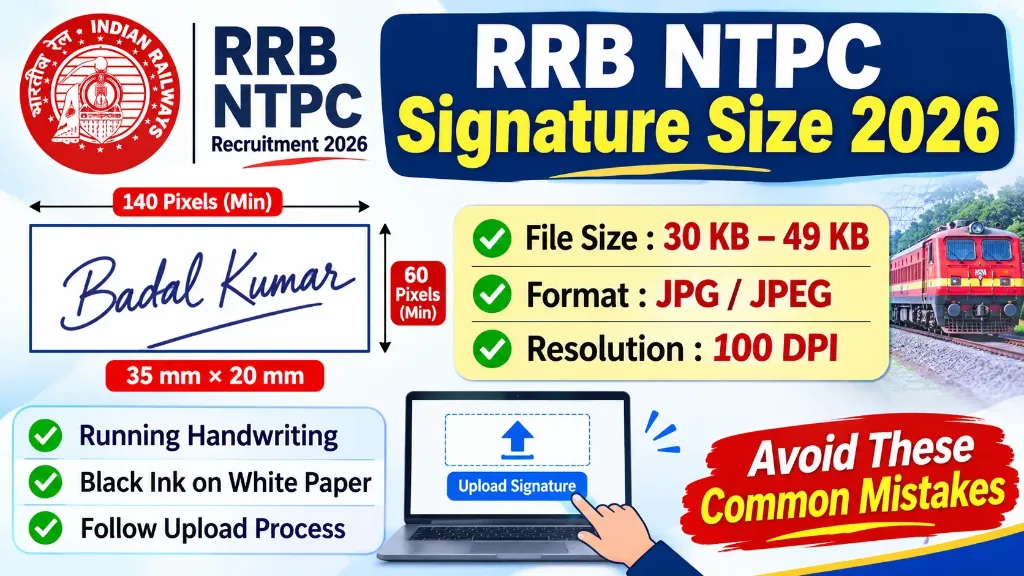
Are you preparing to apply for RRB NTPC 2026 but confused about the correct signature size, dimensions or file format? Don’t worry. Uploading a signature may look like a small step, but using the wrong format or an unclear image can create problems with your application.
The Railway Recruitment Board has prescribed specific guidelines for uploading candidates’ signatures. Applicants must prepare their scanned signatures according to the required file size, pixel dimensions, resolution and handwriting rules.
In this article, you will learn the RRB NTPC signature size 2026, the correct image format, how to create a signature image at home, how to resize it using an online tool and which mistakes you should avoid.
Let’s understand all the requirements step by step.
RRB NTPC Signature Size 2026: Quick Overview
Before preparing your signature, check the technical specifications prescribed for the 2026 NTPC recruitment cycle.
| Signature Requirement | Official Specification |
|---|---|
| File Format | JPG / JPEG |
| File Size | 30 KB to 49 KB |
| Minimum Width | 140 Pixels |
| Minimum Height | 60 Pixels |
| Scanning Resolution | Minimum 100 DPI |
| Signature Box Size | 35 mm × 20 mm |
| Ink Colour | Black |
| Paper Background | White |
| Writing Style | Running Handwriting |
| Signature | Must belong to the candidate |
Important: The dimensions of 140 × 60 pixels are the minimum requirements. The signature must also be centred within the designated 35 mm × 20 mm box on the application form.
Always follow the detailed notification applicable to your particular CEN number if RRB publishes a revised instruction or corrigendum.
What Is the RRB NTPC Signature Size in KB for 2026?
The required signature file size for RRB NTPC 2026 is between 30 KB and 49 KB.
This means:
- Your signature image must not be smaller than 30 KB.
- Your signature image must not exceed 49 KB.
- A file of 20 KB or 25 KB does not meet the requirement.
- A file of 50 KB or more is also outside the permitted range.
For example, suppose your scanned signature is 65 KB. Even if the image looks clear, it does not meet the prescribed file-size requirement.
You will need to compress or resize the image while maintaining its clarity.
A useful tip is to aim for a file size of around 35 KB to 45 KB. This gives you some room within the permitted range and helps avoid being too close to either limit.
RRB NTPC Signature Dimensions 2026 in Pixels and CM
Apart from file size, candidates must also follow the prescribed image dimensions.
The minimum signature image dimensions are:
- Width: 140 pixels
- Height: 60 pixels
The signature should fit inside the designated box measuring:
- Width: 35 mm
- Height: 20 mm
In centimetres, this box measures 3.5 cm × 2 cm.
Your signature must be properly positioned and centred within this area. Avoid cropping the first or last part of your signature.
Remember that pixel dimensions and physical dimensions are not exactly the same thing. A pixel-based image can have different physical printing sizes depending on its DPI resolution.
Therefore, check the pixel dimensions, scanning resolution and appearance of the signature rather than relying on only one measurement.
What Type of Signature Is Required for RRB NTPC 2026?
RRB has specific handwriting requirements for candidates.
Your signature must be written by you using a black ink pen on white paper. It should be in normal running handwriting, also known as cursive or joined handwriting.
Signatures written in block letters, capital letters or disconnected letters are not accepted under the prescribed rules.
For example:
- Correct style: Your usual running handwritten signature.
- Incorrect style: YOUR NAME written completely in CAPITAL LETTERS.
- Incorrect style: YOUR NAME written in separate block letters.
Your signature should also be:
- Clear and easy to read.
- Completely visible in the scanned image.
- Written on a plain white background.
- Free from unnecessary marks or shadows.
- Similar to the signature you will use during the recruitment process.
Important: The signature uploaded during the application must match the signature provided during examinations, document verification, medical examination and appointment.
Using a different signature at different stages can create serious verification problems.
How to Make a Signature for RRB NTPC 2026
You do not need a professional scanner or expensive software to prepare your signature. You can create a suitable signature image using a smartphone or computer.
Follow these simple steps.
Step 1: Take a Clean White Sheet
First, take a plain white sheet of paper.
Make sure that the paper is clean and does not have lines, printed text, stains or unnecessary marks.
Avoid using coloured paper or a notebook page with visible ruling.
Step 2: Sign Using a Black Ink Pen
Take a black ink pen and write your signature on the white paper.
Keep these points in mind:
- Write your signature naturally.
- Use running handwriting.
- Do not write your full name in block or capital letters.
- Keep the signature inside a reasonable area.
- Avoid overwriting or unnecessary corrections.
You should use the same signature style that you normally use.
Step 3: Scan Your Signature
After completing your signature, scan the paper using a scanner or a suitable mobile scanning application.
Make sure the scanning resolution is at least 100 DPI.
If you are using your smartphone camera, place the paper on a flat surface and take the picture from directly above.
Use sufficient lighting so that the signature remains clear.
Avoid shadows, reflections and camera blur.
Step 4: Crop the Signature Image
After scanning, open the image using an image editor.
Crop the unnecessary white space around the signature, but do not cut any part of your actual handwriting.
The signature should remain fully visible.
Also, keep some suitable white space around the writing so that it does not appear squeezed against the image boundaries.
Step 5: Resize and Compress the Image
Now check the image dimensions and file size.
Your final signature image must satisfy these conditions:
- Image format should be JPG or JPEG.
- File size should be between 30 KB and 49 KB.
- Minimum dimensions should be 140 × 60 pixels.
- Scanning resolution should be at least 100 DPI.
You can use an online image resizer or signature compressor to adjust the image.
However, make sure the tool does not distort your handwriting or reduce the image quality.
Step 6: Save and Check Your Signature
Save the final image on your device.
Before uploading, open the saved file and check the following:
- Is the signature completely visible?
- Is the handwriting clear?
- Is the background white?
- Is the file in JPG or JPEG format?
- Is the file size within 30 KB to 49 KB?
- Does the image meet the minimum pixel dimensions?
Once everything is correct, your signature is ready to upload.
How to Upload a Signature in the RRB NTPC Application Form
After preparing your signature image, follow these steps to upload it to the online application form.
Step 1: Visit the official Railway Recruitment Board website and open the relevant NTPC recruitment notification or application link.
Step 2: Log in to the RRB application portal using your registered login credentials.
Step 3: Open your NTPC application form and complete the required personal, educational and other details.
Step 4: Go to the document upload section and find the Signature Upload option.
Step 5: Click on the upload button and select your prepared JPG or JPEG signature image.
Step 6: Wait for the image to upload. Check the preview carefully to ensure the signature is clear and completely visible.
Step 7: Continue with the remaining application steps and review the entire application before final submission.
Do not submit the application without checking the uploaded signature.
Common Mistakes to Avoid While Uploading an RRB NTPC Signature
Many candidates make small mistakes while preparing their signature images. Some of these mistakes can lead to application rejection.
Here are the most important errors you should avoid.
1. Uploading a Signature Below 30 KB
A signature file smaller than 30 KB does not meet the prescribed requirements.
Check the file size before uploading.
2. Uploading a Signature Above 49 KB
Similarly, a file exceeding 49 KB is not acceptable.
Use an image compressor to bring the file within the permitted range without making it unclear.
3. Writing Your Name in Capital Letters
RRB requires running handwriting rather than block or capital letters.
Write your normal signature instead of simply typing or writing your name in capital letters.
4. Using Blue or Other Coloured Ink
The notification specifies a black ink pen.
Do not use blue, red or other coloured ink for your signature.
5. Using a Coloured or Ruled Background
Always use plain white paper.
A non-white background, ruled paper or unnecessary marks can make the image unsuitable.
6. Uploading a Blurred Signature
Your signature should be clear and readable.
Avoid uploading low-resolution images or photographs taken in poor lighting.
7. Cropping Part of Your Signature
Never crop the beginning or end of your handwriting.
Your complete signature must be visible in the uploaded image.
8. Uploading Someone Else’s Signature
The signature must belong to the applicant.
Do not use a parent’s, friend’s or any other person’s signature.
9. Changing Your Signature During the Recruitment Process
Use a consistent signature throughout the recruitment process.
The signature on your application should match the signatures provided during examinations, document verification, medical examination and appointment.
Important Note About the RRB NTPC Photograph
Candidates often confuse the photograph requirements with the signature upload requirements.
For the 2026 NTPC application process, the photograph is captured live through the application module using a webcam or mobile phone camera.
This means you should not prepare an old passport-size photograph and try to upload it as a replacement for the live photograph.
The signature, on the other hand, must be prepared separately and uploaded as a scanned JPG or JPEG image.
Follow the instructions displayed in your application portal for the live photograph process.
RRB NTPC Signature Upload Checklist 2026
Before clicking the final submit button, use this checklist to verify your signature.
| Checklist | Requirement |
|---|---|
| Signature belongs to me | Yes |
| Ink colour is black | Yes |
| Paper background is white | Yes |
| Handwriting is in running style | Yes |
| Image format is JPG/JPEG | Yes |
| File size is 30–49 KB | Yes |
| Minimum dimensions are 140 × 60 pixels | Yes |
| Scanning resolution is at least 100 DPI | Yes |
| Full signature is visible | Yes |
| Signature is centred in the designated box | Yes |
Reviewing these points can help you avoid common upload mistakes.